

Essential Soft Skills for Communicating Well on Camera
See also: Non-Verbal CommunicationVideo calls have become a normal part of work, study and family life, yet many people find them harder than conversations in person. The reason is rarely technical. A screen strips away many of the cues we use to connect with others, so the soft skills we normally rely on, such as listening, empathy and reading the room, have to be used more deliberately.
This article looks at the interpersonal skills behind good video communication. You will learn how to build rapport quickly, show that you are listening, read emotions through a screen, manage nerves and recover gracefully when a conversation becomes awkward.
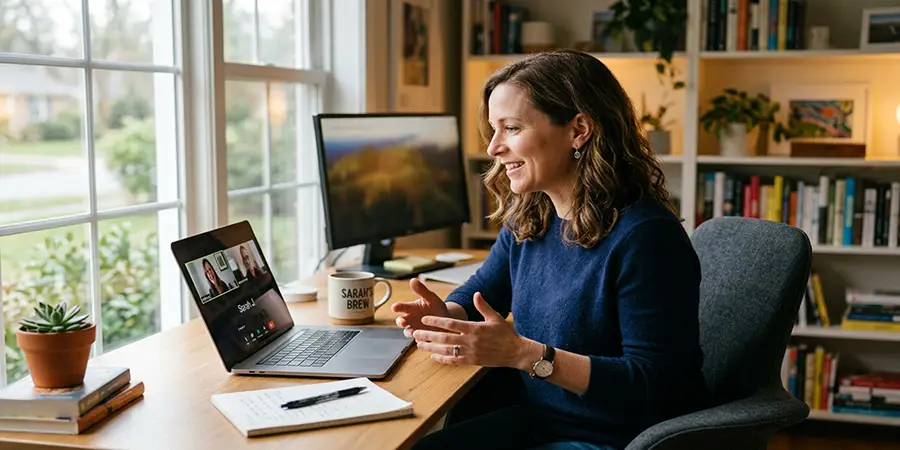
Why Video Calls Test Your Soft Skills
In person, we read each other through a constant stream of cues: posture, gesture, tone of voice and the timing of replies. On screen, many of those cues are reduced to a small rectangle and some arrive a fraction of a second late. That delay matters more than it sounds. A well-known study of ten languages found that speakers typically leave a gap of only around 200 milliseconds between turns (Stivers et al., 2009). Even a short lag can therefore cause people to talk over each other or fall silent together.
Video also adds something that does not exist in person: seeing your own face throughout the conversation. Many people find this tiring and self-conscious, and it pulls attention away from the person they are talking to. Good video communicators compensate by being more intentional about attention, expression and empathy.
Start with the Right Mindset
Confidence on camera begins before the call. A few minutes of mental preparation helps you arrive calm, present and ready to connect.
Clarify your purpose. Decide what you want from the conversation, whether that is to inform, persuade, reassure or simply catch up. A clear intention keeps you focused when nerves rise.
Prepare an opening. Knowing your first sentence removes the most stressful moment of any call.
Calm your body. Take a few slow breaths before joining. Slower breathing steadies your voice and lowers tension.
Show respect for the other person’s time. Join promptly, find a quiet spot and keep your face visible. Small acts of preparation signal that the conversation matters to you.
Key Point
Good communication on camera is mostly about attention. If the other person feels that you are fully present, minor flaws in lighting, background or delivery matter far less.
Build Rapport from the First Minute
The opening and closing moments of a call can influence how the conversation is remembered. Begin with a warm greeting, use the person’s name and allow a moment of friendly conversation before moving on to business. Jumping straight into the agenda can feel cold, especially with people you do not know well.
Cultural expectations vary too. In some cultures, a few minutes of personal conversation is essential before work begins, while in others directness is valued. If you are talking with an international group, follow the other person’s lead and avoid assuming that your own style is the default.
Finish the call on purpose rather than letting it fade. Recap what was agreed, or thank the other person for their time, before saying goodbye. A defined ending avoids the awkward hover over the “leave” button.
Nonverbal Communication on Camera
Because the screen shrinks your movements, small adjustments have a large effect on how warm, confident and engaged you appear.
Look at the lens when it matters. You do not need to stare at the camera throughout, but looking into it when you greet someone or make an important point gives the impression of eye contact.
Use open posture. Sit upright with your shoulders relaxed and let your hands appear naturally now and then. Gestures add energy and show openness.
Let your face do the work. A genuine smile and an attentive, expressive face show interest even when the picture is small, so do not hold back.
Slow down slightly. Speaking a little more slowly and clearly than usual helps everyone follow and signals composure.
Leave a beat before replying. Waiting about half a second after the other person finishes reduces accidental interruptions caused by delay.
Active Listening on Screen
Active listening means showing the other person that you are paying attention and trying to understand them, not simply waiting for your turn to speak. On camera it needs a slightly different approach.
Make your listening visible. Nods, smiles and short responses such as “right” or “I see” should be a little more noticeable than in person, because small movements are easy to miss.
Minimise your self-view. Most apps let you hide your own image. That helps you concentrate on the speaker rather than on your own appearance.
Paraphrase more often. Restate what you heard in your own words, for example “If I understand correctly, the timing worries you more than the cost?” This checks that you have understood when facial cues are limited.
Ask open questions. Questions beginning with “how” or “what” invite fuller answers and make up for the casual small talk that happens naturally in a shared room.
Resist multitasking. People can usually tell when your eyes move to another window, and it signals that the conversation is not your priority.
Try This
In your next call, paraphrase the other person’s main point at least twice. Notice how often they add detail or correct you. That is understanding being built in real time.
Empathy and Emotional Intelligence Online
Emotional intelligence, the ability to notice and respond to emotions in yourself and others, matters even more when cues are limited. You cannot rely on seeing someone’s whole body language, so you need to pay closer attention to what is available.
Listen to tone as well as words. A flat voice, long pauses or shorter answers are possible indicators of worry, tiredness or disagreement.
Check in directly. If someone seems quiet, a gentle question such as “How does that sound to you?” gives them an easy way to speak up.
Acknowledge feelings. Phrases like “That sounds frustrating” show that you have heard more than the facts.
Manage your own reactions. If you feel irritated, take a breath and respond rather than react. Tone carries across a screen even when your face is small.
Follow up in writing. A short message after a sensitive call can confirm what was agreed and reassure the other person.
Handling Awkward Moments with Grace
Even with good habits, every video conversation runs into some friction. How you handle it says more about your interpersonal skills than avoiding it entirely.
| Situation | What it feels like | Soft skill to use |
| You both start talking at once | Awkward overlap, then both stop | Smile, gesture for them to go first, and return to your point afterwards |
| A long pause | Uncertainty about whether the connection has dropped | Check in lightly (“Did I lose you there?”) or ask a follow-up question |
| The picture freezes | You miss expressions and reactions | Switch to audio only for a minute rather than talking over the glitch |
| Someone seems disengaged | Silence or minimal responses | Empathy: ask an open question and invite their view |
| The conversation stalls | Neither person knows what to say next | Refer back to something they said earlier and ask them to say more |
Practising Your Skills
Like any soft skill, on-camera communication improves with practice, and low-pressure settings are the best place to start. A casual video chat with a friend, a language-exchange partner or someone new lets you rehearse eye contact, pacing and listening without the stakes of an interview or client meeting. When talking to people you do not know, stay respectful and avoid sharing personal details such as your address or workplace.
You can also record yourself during a practice call, if the other person agrees, and watch a few minutes of it. Most people notice habits they can fix immediately, such as looking down too often or speaking too quickly. Asking a trusted colleague for feedback on how you come across is another effective way to grow.
Common Mistakes to Avoid
Most poor video conversations fail for small, fixable reasons rather than big ones.
Talking for too long. Without visual cues that someone wants to speak, it is easy to deliver a monologue. Pause regularly and invite a response.
Staying emotionally distant. Reading from notes or keeping a blank expression makes you seem disengaged, even if you are concentrating.
Interrupting. Lag makes interruptions more likely and more irritating. Wait slightly longer than you think necessary.
Ignoring quieter participants. In group calls, the people who say least are often the easiest to overlook. Invite them in by name.
Skipping the warm-up. A minute of friendly conversation builds trust, just as it would in person.
Frequently Asked Questions
How can I seem more confident on camera?
Prepare your opening sentence, sit upright, breathe slowly and focus on the other person rather than on yourself. Confidence grows with repetition, so seek out regular low-stakes practice.
Should I keep my camera on all the time?
Where it is expected, yes, because seeing each other helps build trust. In longer meetings it is reasonable to agree that people may turn cameras off for parts of the call to reduce fatigue. Norms differ between cultures and workplaces, so it is worth asking.
Is it rude to take notes during a call?
Not if you say so. A quick “I am just going to jot that down” turns a downward glance into a sign of attention rather than distraction.
Final Thoughts
Communicating well on camera is less about technology and more about people. Arrive with a clear intention, build rapport early, make your listening visible, notice how others are feeling and handle the inevitable glitches with good humour. Practise these soft skills for a few weeks and video conversations will start to feel almost as natural, and as rewarding, as talking in the same room.
Reference: Stivers, T. et al. (2009). Universals and cultural variation in turn-taking in conversation. Proceedings of the National Academy of Sciences, 106(26), 10587–10592.