

6 Tips to Help You Prioritize Tasks
to Improve Your Productivity
See also: Self-Motivation
Productivity is a major issue at both corporate and individual levels.
According to workplace productivity studies, the average employee is productive for only about three hours per day. That’s roughly 31% of an 8-hour workday!
Organizations have gone to great lengths to boost employee productivity. However, individuals also have a critical role to play in maximizing their own output and efficiency.
One of the most effective ways to boost productivity is by prioritizing tasks. Knowing how to prioritize tasks according to their importance helps to mitigate overwhelming work pressure. It also improves efficiency and productivity by giving you clarity over what tasks need to be done, the priority to follow, and the timeframe to work with.
Are you looking to ramp up your productivity? Here are six practical tips to help you out.
6 Practical Tips for Prioritizing Tasks
Create a Master Task List
A master task list puts everything that requires attention into a document or app, giving you a complete overview of everything you need to do. This helps you know what needs to be done and the tasks that require your immediate attention.
Creating a master task list will also help you when it comes to time management since it gives you a comprehensive picture of every task that needs to be completed.
How do you create an effective master task list? Here are a few tips to follow:
Consider the Project Size: The structure of your task list depends on your project’s size. For larger projects or complex tasks, you may want to break them down into smaller, manageable subtasks.
Establish the Project’s Timeline: Decide on the project’s timeline to determine how much time will be allocated to each task or subtask. You can use past projects to estimate the timeline. For example, if you’ve handled a similar subtask before, think about the time it took to complete it. Then, use that as a guide to establish the required time for the current subtask.
For example, when running a complex marketing campaign, every part of the business operation should be broken down into chunks. You might have one team that researches target audiences, another team that handles outreach and communications, and an editorial team that manages the content creation process using dedicated software tools.
Don’t be in a hurry to jump into a project without first identifying exactly what needs to be done. This can be a huge mistake as you could quickly end up overlooking critical tasks. It also increases the chances of getting overwhelmed, especially when you haven’t prioritized the tasks based on their urgency or importance.
Prioritize Urgent and Important Tasks
After making a list, the next step is determining which tasks should be prioritized. For example, while urgent tasks such as emails or calls might disrupt workflow if left unattended, important tasks are less disruptive but help achieve bigger, long-term goals.
Separate your urgent tasks from important tasks with the Eisenhower Decision Matrix (a concept coined by former U.S. President Dwight D. Eisenhower). It’s also widely known as the task prioritization matrix.

This task prioritization matrix organizes your tasks into four distinct categories:
Important, but not urgent: Decide the time to do this, and schedule it.
Urgent, but not important: You may be able to delegate these tasks to others.
Important and urgent: Do these tasks immediately.
Neither important nor urgent: You can drop or eliminate these tasks from your schedule.
You can discern high-priority and critical tasks by assessing the value they add to your overall business goals and how many people are impacted by the work.
For instance, if you’re short on staff but have a customer waiting list and an internal presentation deck to finish, it’s critical that you answer the support tickets first. Why? It’s client-focused. They’re both important tasks, but one is more urgent and time-sensitive. Overall, the stakes are higher when more people are affected.
Along with the decision matrix, consider using a task management tool to manage your entire team’s workload. Task management tools give you complete visibility over each assignment, helping you prioritize effectively and simplify overall coordination.
Evaluate Tasks Based on Estimated Efforts
To avoid feeling overwhelmed when making a priority list, evaluate tasks based on the effort, time, and resources needed. When handling data-heavy tasks, automation tools can also save significant time. For example, if your workflow involves extracting tables from screenshots or scanned documents, using a JPG to Excel converter can quickly turn image-based data into editable spreadsheets, helping you organize and prioritize work more efficiently.
In the software engineering industry, this is called effort estimation. It’s usually done at the beginning of a sprint. And while you can do it manually through team discussions, modern project management software can estimate effort automatically based on previous performance data.
Estimating each task’s effort stops you from setting unrealistic project goals. It also improves collaboration between team members because they can discuss resource needs and offer opinions on group efforts during meetings.
So, if you’re handling a team project, make sure to consult your teammates to estimate the resources and effort required to complete the tasks. If they’ve done similar projects before or possess specialized knowledge, it’s much easier to quantify the project’s needs.
If you feel like you can’t handle the higher-effort tasks right away, and there’s no tight deadline, consider the following:
Do the shorter tasks first. This reduces the immediate workload and motivates you to tackle bigger tasks later.
Then, break down the major tasks into subtasks to stay focused on your primary goal. This can keep you highly motivated since smaller subtasks feel significantly less intimidating.
Use time management tools to track the time it takes to complete your assignments. You can also use these tools to monitor the entire team if you’re the project manager.
Tracking task duration helps you understand how long it usually takes to finish certain types of work, making it easier for you to estimate future timelines accurately.
When estimating your tasks, you may also need to add extra buffer time to accommodate for unexpected delays. This is vital, especially for complex tasks that carry more risks or dependencies.
Let’s say, for example, you have several tasks that build upon each other. That means you may have a task assigned to you, but you can’t start working on it until another team member has completed their prerequisite portion.
Similarly, you may have a task but can’t proceed until a client or stakeholder provides critical details.
Such dependencies introduce risks that can cause bottlenecks and hurt your productivity. Therefore, you must factor them in while designing a timeline for each task.
Schedule Your Tasks Using a Calendar Tool
Now that you’ve determined your most important tasks, plan them on your calendar. You can use scheduling software to ensure you miss nothing while new tasks arise and priorities shift.
When there’s a new task, ask for the start and end date to immediately include it in your calendar. You may even want to set an earlier personal deadline to review and make corrections before the final submission.
Using a calendar tool is essential for ensuring all deadlines are met. The tool will bring your workflows into a single dashboard, giving you a clear, centralized view of what needs to be done for the whole week or month.
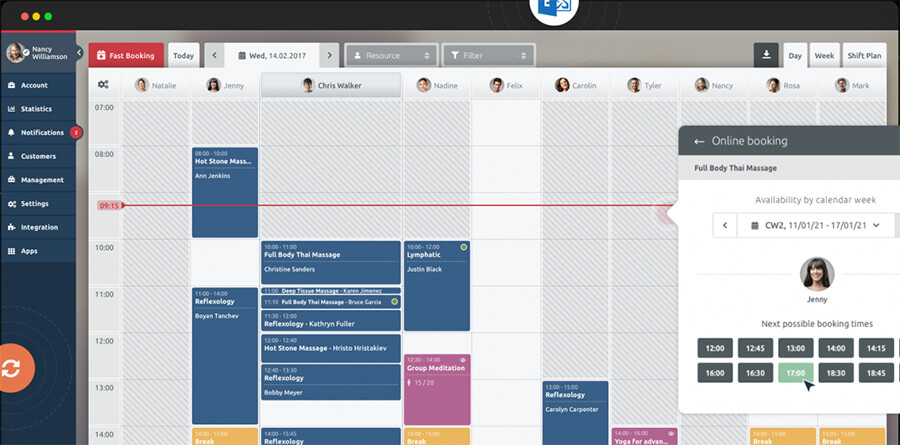
A calendar tool will also prove incredibly helpful in preventing scheduling conflicts. For example, when a new priority drops onto your desk, the calendar view will instantly show you how the rest of your scheduled tasks will be affected.
Review Your Task List Regularly
Regularly reviewing your task list shows you the actual progress of your project. It also informs you of missed tasks and gives you an opportunity to find workarounds, thus increasing work clarity and efficiency. This is a core practice that highly successful teams rely on when managing complex, long-term deliverables.
Review your to-do list by grouping related tasks into sections. You should perform these reviews weekly to understand emerging patterns and trends in your work habits. This habit will lead to better decision-making, which further improves productivity.
Weekly reviews also help you plan proactively for the coming week, giving you the necessary wiggle room to adjust timelines and maximize output.
Demonstrate Flexibility and Adaptability
Priorities are constantly shifting in a dynamic work environment. You might prioritize a task on Monday, only to have expectations and deadlines completely changed by Wednesday. To keep up with inevitable priority shifts, you’ll need to be super flexible and adaptable.
Learn to shift your focus gracefully and bounce back from setbacks. Keep an open mind and be willing to learn new techniques to complete a difficult task if your current approach isn’t working.
Being flexible and adaptable directly improves your problem-solving skills, helping you to not just survive, but thrive under pressure.
Conclusion
Effective task prioritization is a proactive way of meeting deadlines and consistently increasing productivity. It sharpens your focus and gives you a necessary bird’s-eye view of your progress. If you don’t prioritize, it’s remarkably easy to get distracted by low-value tasks, which ultimately degrades your performance.
Prioritizing also reduces stress and anxiety by helping you control your time; you can work smarter on your biggest priorities and still carve out time to rest. Furthermore, it helps you avoid procrastination by providing absolute clarity. With a well-defined picture of what you need to do, you can focus all your energy on achieving it.
From creating a master task list to leveraging the Eisenhower Matrix and reviewing your progress regularly, these six foundational tips will optimize your productivity. By implementing them, you will consistently meet your deadlines while maintaining a healthy, sustainable work-life balance.

Further Reading from Skills You Need
The Skills You Need Guide to Personal Development
Unlock your potential with our comprehensive guide to personal growth. Learn how to set effective personal goals and find the motivation to achieve them. Dive into personal development, a suite of essential skills designed to help you thrive in your career, studies, and personal life.
Building on the success of our bestselling eBook, this updated third edition is perfect for anyone looking to enhance their skills and learning capacity. Filled with practical, easy-to-follow advice, the guide empowers you to take charge of your development journey.
About the Author
Nico is a productivity expert and business strategist. He works with enterprise clients globally, helping them scale operations, improve team efficiency, and optimize time management strategies for maximum growth.